SimpleRisk 20261020-001: Search Everything From the Top Bar
SimpleRisk 20261020-001 is a search-and-stability release. Advanced Search now reaches across the whole platform, upgrades are more dependable, and a broad round of hardening and bug fixes makes day-to-day work smoother.
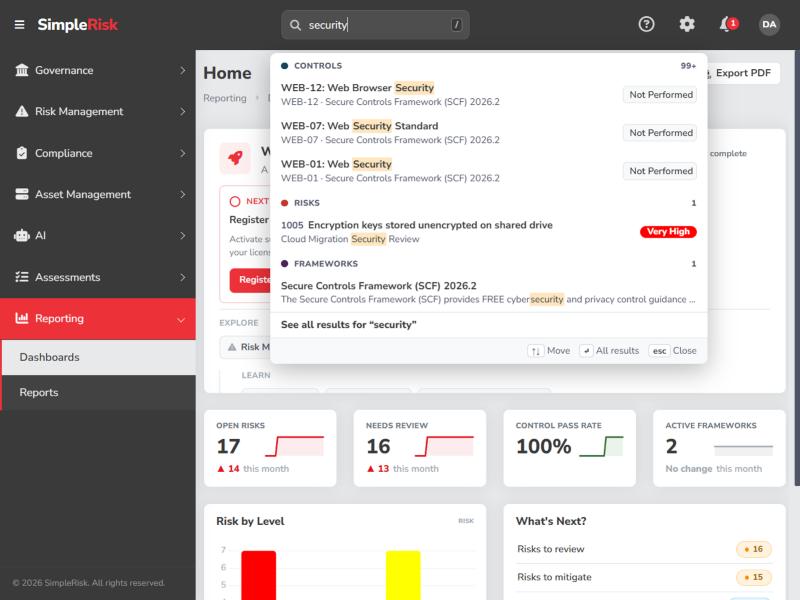
Search everything from the top bar
Advanced Search has grown from a risk finder into a platform-wide search. From the top bar you can now search risks, frameworks, controls, documents, exceptions, tests, audits, assets, and asset groups (plus incidents, assessments, and vulnerabilities when those Extras are active). A new Search page shows full results, a connected-records view shows how the items you find relate to each other, and result links can be shared with teammates. If you have scripts that called the old, unused Advanced Search API route directly, see the release notes for the replacement endpoints.
Upgrades you can count on
The one-click upgrade is more resilient. Instances upgrading across several releases no longer risk stopping partway and being left unavailable. The database backup taken before an upgrade now connects on your configured database port, a failed Extra download tells you why it failed, and upgrade failure messages are clearer about what went wrong and which database version was involved.
Security hardening
This release adds an optional HTTP Strict Transport Security (HSTS) setting under Configure > Security, so administrators can tell browsers to always use HTTPS. We also tightened input validation, request handling, and access checks in several places across Core and the Extras. One note for integrators: if you call the AI document-install or Vulnerability Management full-sync endpoints from your own scripts, those calls must now use POST.
Dependable imports and uploads
Large user imports now run in the background with a progress view, so they no longer time out on hosted instances. Attaching a file that is larger than your server allows is now refused with a clear message instead of a server error, and attachment forms show the real size limit up front. Excel exports of risks, assets, and controls no longer show stray characters such as &, and re-importing categories or teams with long names no longer creates duplicates.
Smaller improvements
Vulnerability Management now names Tenable assets by hostname when scans target IP ranges and keeps their associated risks after a sync. Assessments are friendlier: the first send of a questionnaire no longer asks about pre-populating answers, questions generated from Secure Controls Framework controls are Required by default, and deleting an assessment cleans up its uploaded files. Define Tests, exceptions, and audits received a round of fixes (including edit windows that kept stale data, imported tests that wrongly demanded an Anchor Date, and deleted audits that came back), and due-date counts are now correct across daylight-saving changes. Nested frameworks are easier to tell apart in the framework rail, and the Plan Projects toolbar fits narrow screens.
Upgrading
The upgrade is delivered through the standard SimpleRisk upgrade flow. As always, we recommend backing up your database before applying any release in production.
Check out the full release notes and the admin guide for upgrade details, or reach out to our team if you'd like help planning the rollout.